

Warehouse Robot Project Checklist: What to Prepare Before Supplier Evaluation
Prepare the workflow, operating baseline, load and handoff, site, systems, people, safety inputs, category-specific details, and validation questions needed to begin evaluating AGVs, AMRs, autonomous forklifts, or autonomous stackers. This checklist is not a final product recommendation, quotation, or safety approval.
Quick answer: What should you prepare for a warehouse robot project?
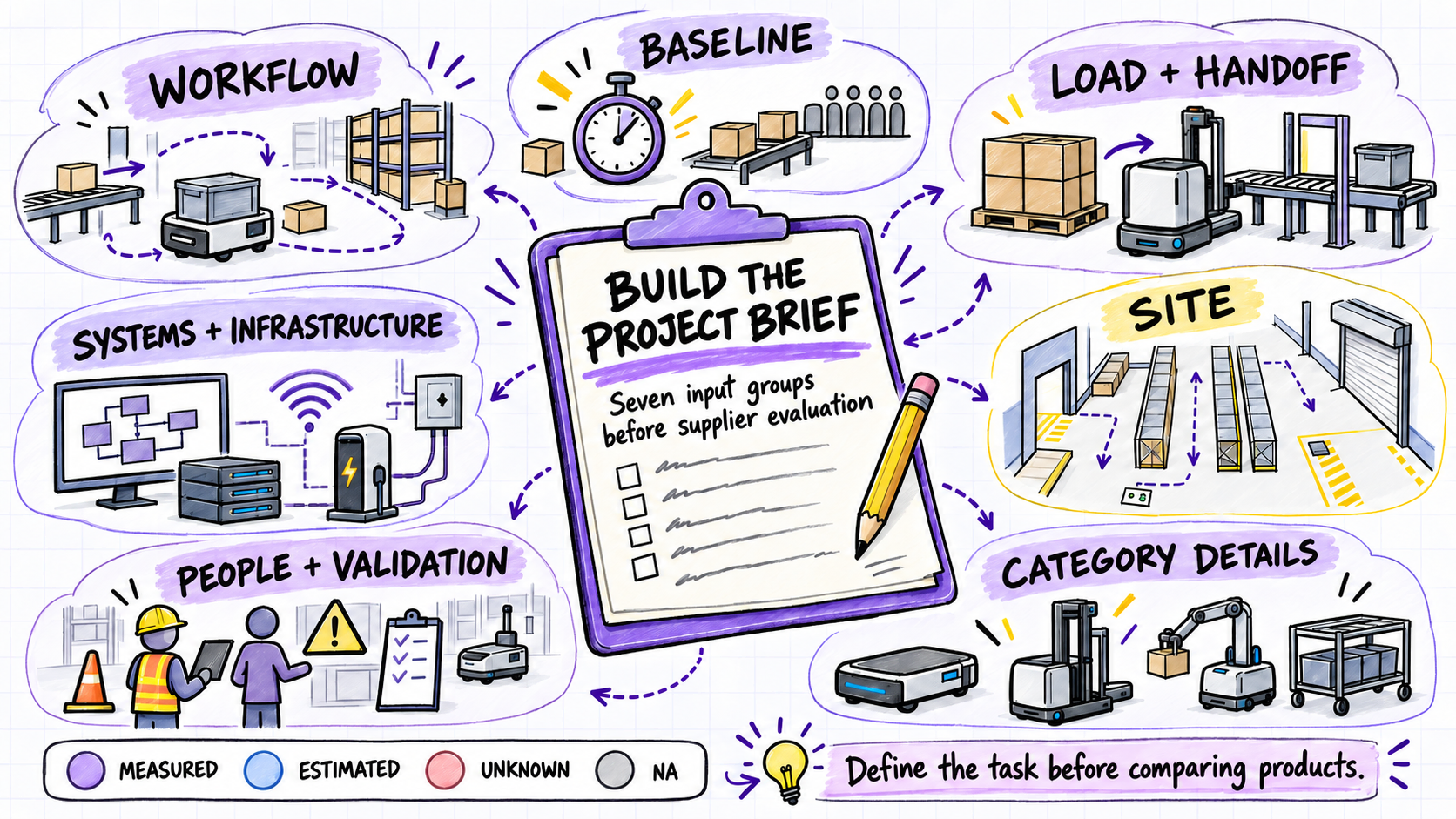
Before evaluating a warehouse robot, prepare seven groups of information:
- The workflow: what needs to move, from where, to where, and why this task is being considered.
- The current baseline: task volume, shifts, travel, waiting, manual handling, peaks, and exceptions.
- The load and handoff: load carrier, dimensions, weight range, stability, pickup, transport, and delivery conditions.
- The site: routes, aisles, turns, doors, slopes, floor conditions, intersections, and shared traffic.
- The systems and infrastructure: task triggers, completion signals, existing software and equipment, network conditions, power, and charging.
- The people and validation plan: project owners, operators, IT, engineering, safety, maintenance, training, test methods, and acceptance evidence.
- The category-specific details: only the additional information relevant to the candidate family, such as towing interfaces, top modules, conveyor or tote transfer, pallet entry, fork geometry, load center, lift height, rack interface, aisle, or turning requirements.
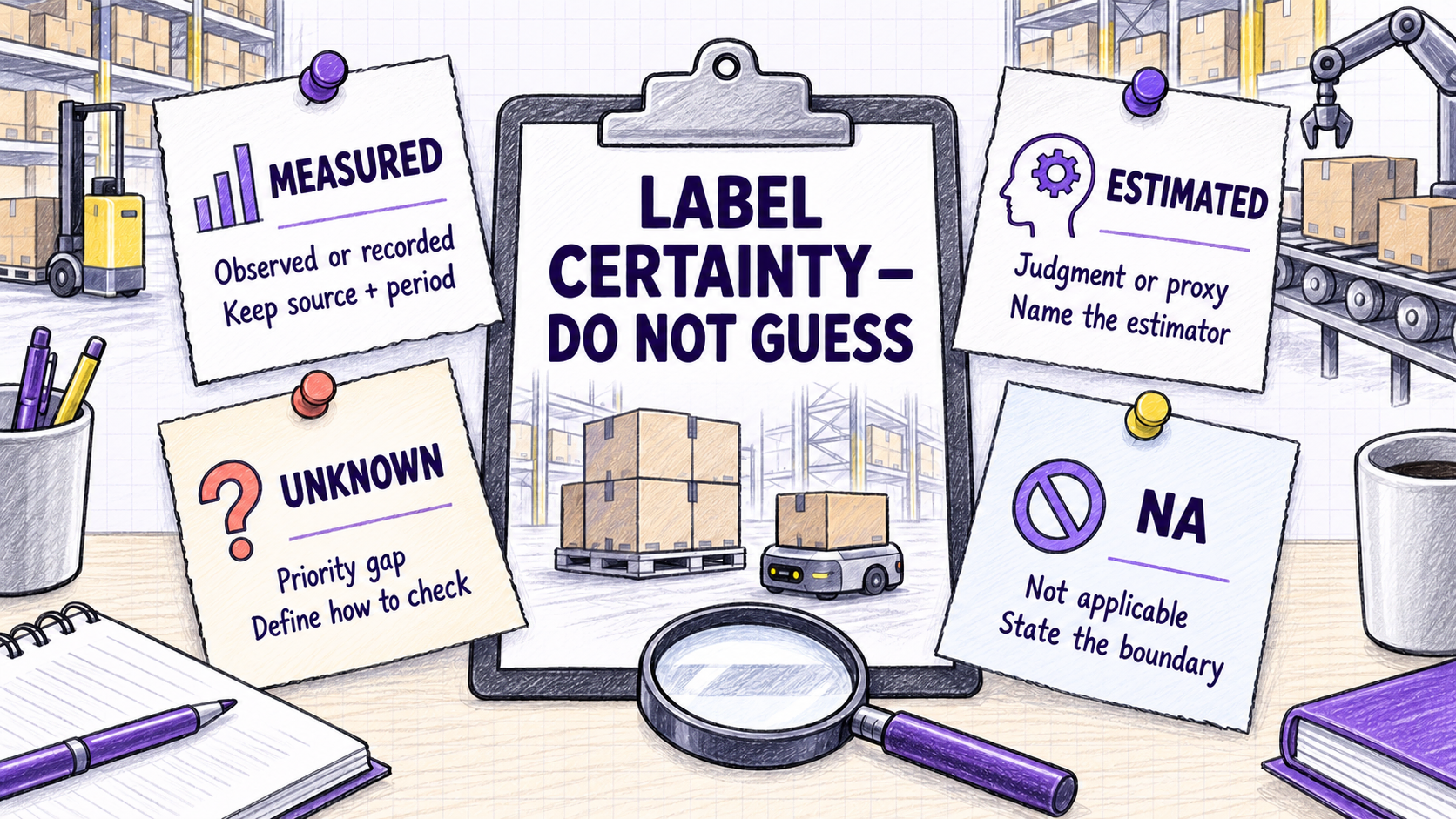
Do not force uncertain information into a precise number. Mark each input as Measured, Estimated, Unknown, or NA. An honest gap is more useful than a false assumption because it shows what must be checked during requirements review, a site and layout review, simulation where appropriate, a representative demonstration or limited pilot when needed, and on-site commissioning or workflow testing for the selected solution.
This checklist does not select a robot, calculate fleet size, establish compliance, or replace a site-specific risk assessment. Those conclusions depend on the proposed system, load, environment, integration design, and applicable requirements.
Its scope is early project preparation for the four warehouse robot categories currently supported by BotOnly content: AGVs, AMRs, autonomous forklifts, and autonomous stackers. It does not claim that every product performs every task. Robotic arms, AS/RS, conveyors as standalone systems, and other unlisted automation categories remain outside this guide unless BotOnly later adds verified source material.
Why start with a project brief instead of a robot specification?
A warehouse robot is part of a material-flow system. Its performance depends not only on the mobile platform but also on the load, route, handoff, traffic rules, task logic, charging, software connections, operators, and exception procedures.
Established project practice begins with the operation rather than the equipment: state the observable problem, bound one process, and evaluate every proposed solution against that same task. This sequence improves comparison quality; it does not guarantee a result.
A useful first brief should let another person understand the proposed task without relying on statements such as “we want an AMR” or “we need to automate the warehouse.” It should show what happens today, what should improve, which constraints are known, and which questions remain open.
If your team is still deciding between route-following and more autonomous navigation approaches, read AGV vs AMR: Key Differences and How to Choose. This guide begins one step later: preparing the operational information required for a focused project evaluation.
Define one material-flow problem
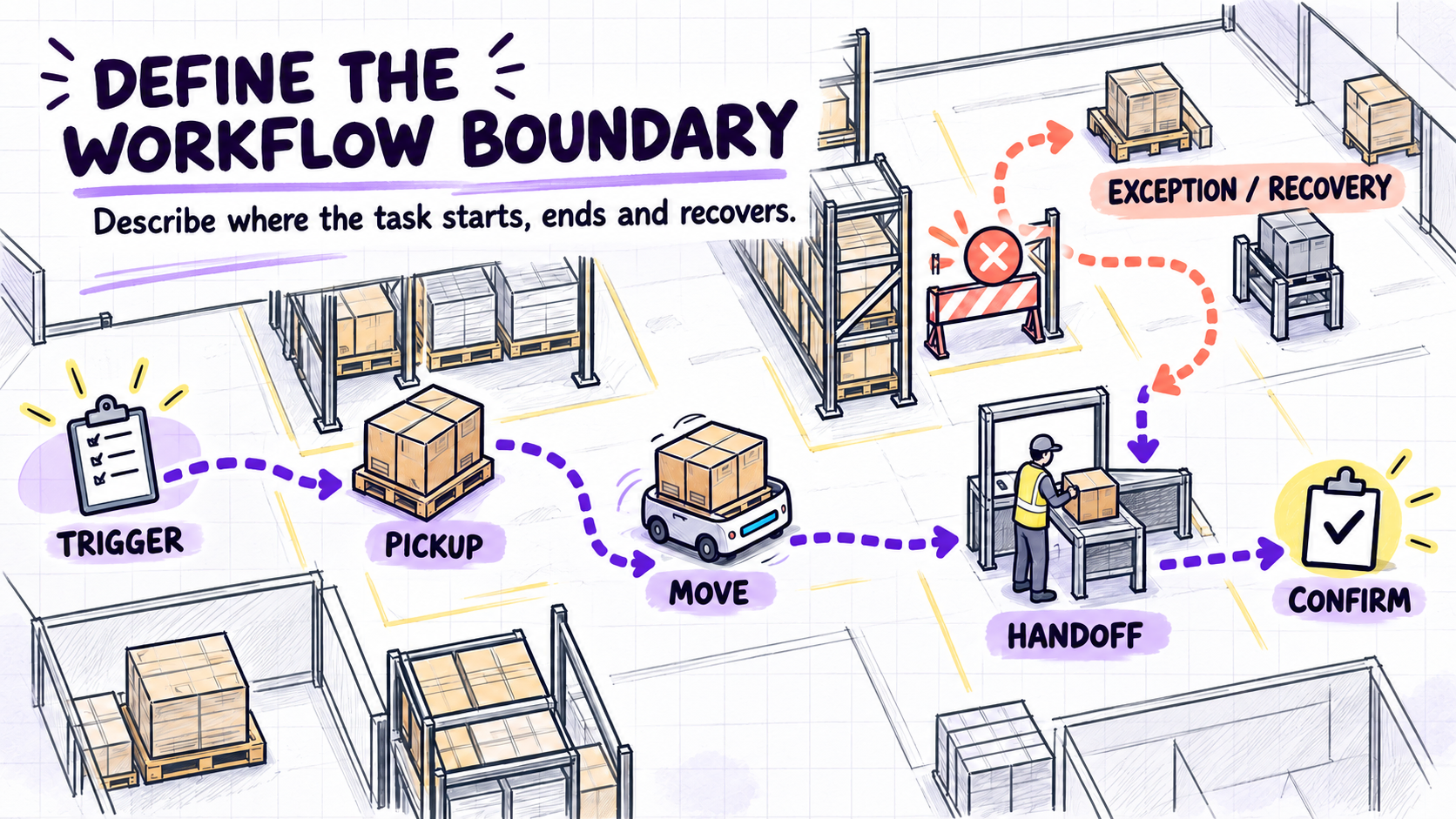
The first project should have a visible boundary. Avoid beginning with “automate all internal logistics.” Choose one movement that can be observed from start to finish.
Record:
- what initiates the task;
- the pickup point;
- the material and load carrier;
- the destination;
- who or what loads and unloads it;
- how completion is confirmed;
- what happens when the normal flow cannot continue.
For example, “move pallets from receiving to storage” is incomplete. State the trigger, exact destination, and whether the vehicle only transports or must also lift, align, and place the load.
Describe the work accurately enough to evaluate different approaches against the same task; do not pre-design the solution.
Also document why this process is being considered. The reason may be excessive travel, unstable staffing, congestion, waiting between operations, repeated manual transport, a capacity constraint, or another observable problem. Keep the objective tied to an operational baseline rather than a general desire to “use robots.”
Record the current operating baseline
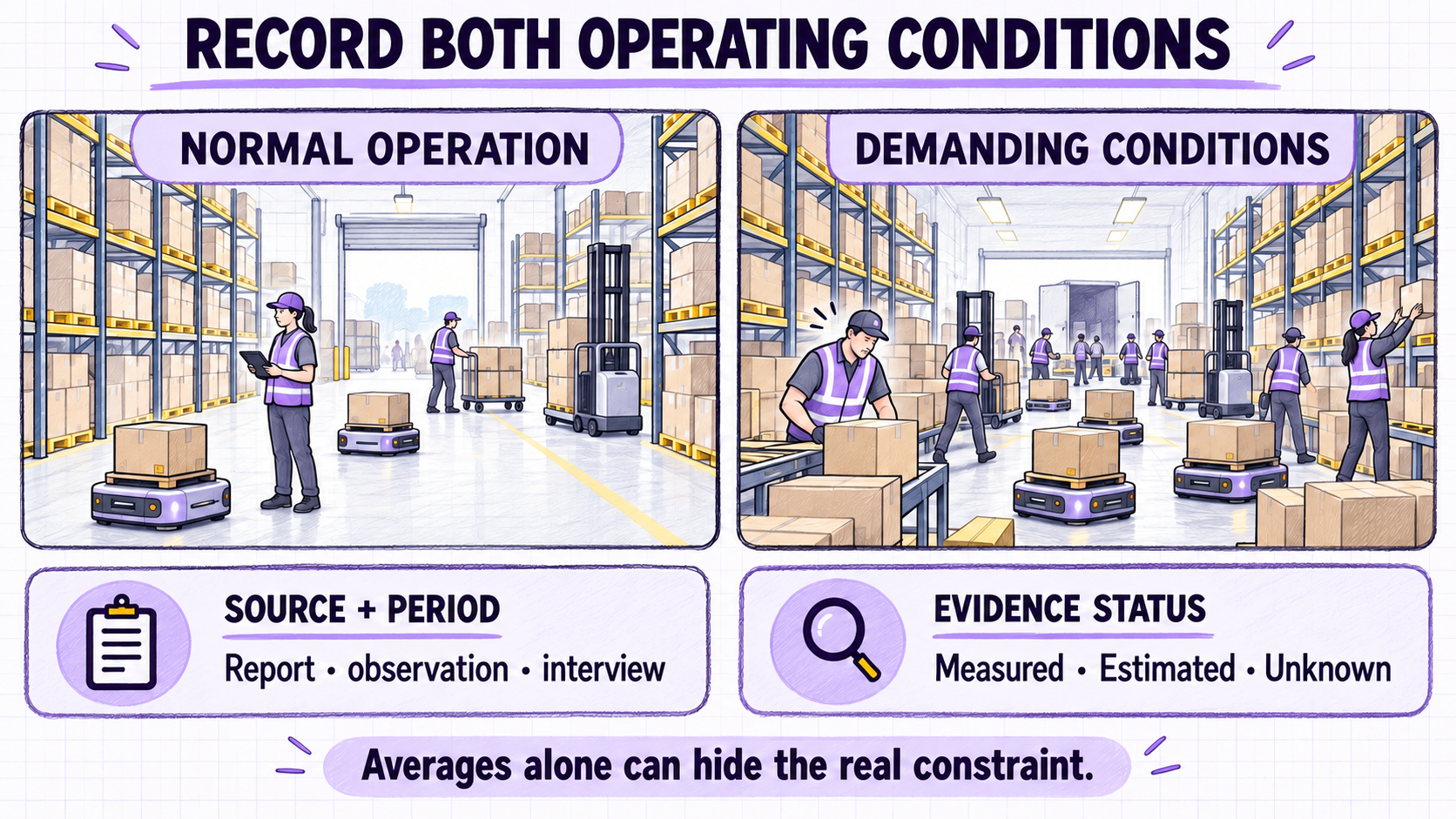
A proposed improvement needs a current-state reference. Gather data for normal operation and for the conditions that put the process under the most pressure.
Useful inputs include:
- tasks or moves per hour, shift, or day;
- normal and peak volumes;
- number and timing of shifts;
- route distance and typical travel time;
- loading, unloading, and waiting time;
- queueing at doors, intersections, lifts, or stations;
- manual interventions;
- incomplete, delayed, or cancelled tasks;
- recurring obstructions and exceptions;
- planned changes in volume, layout, or operating hours.
Use the unit that reflects the operation: pallet moves per hour, for example, or line-side delivery frequency and replenishment windows.
Separate observations from estimates. Record each data source and period; label supervisor estimates as Estimated and unobserved route blockages as Unknown.
Do not copy throughput targets from product pages. Required rates must come from site demand and service expectations; capacity evaluation must state its route, service-time, charging, and traffic assumptions.
Document the load and every handoff
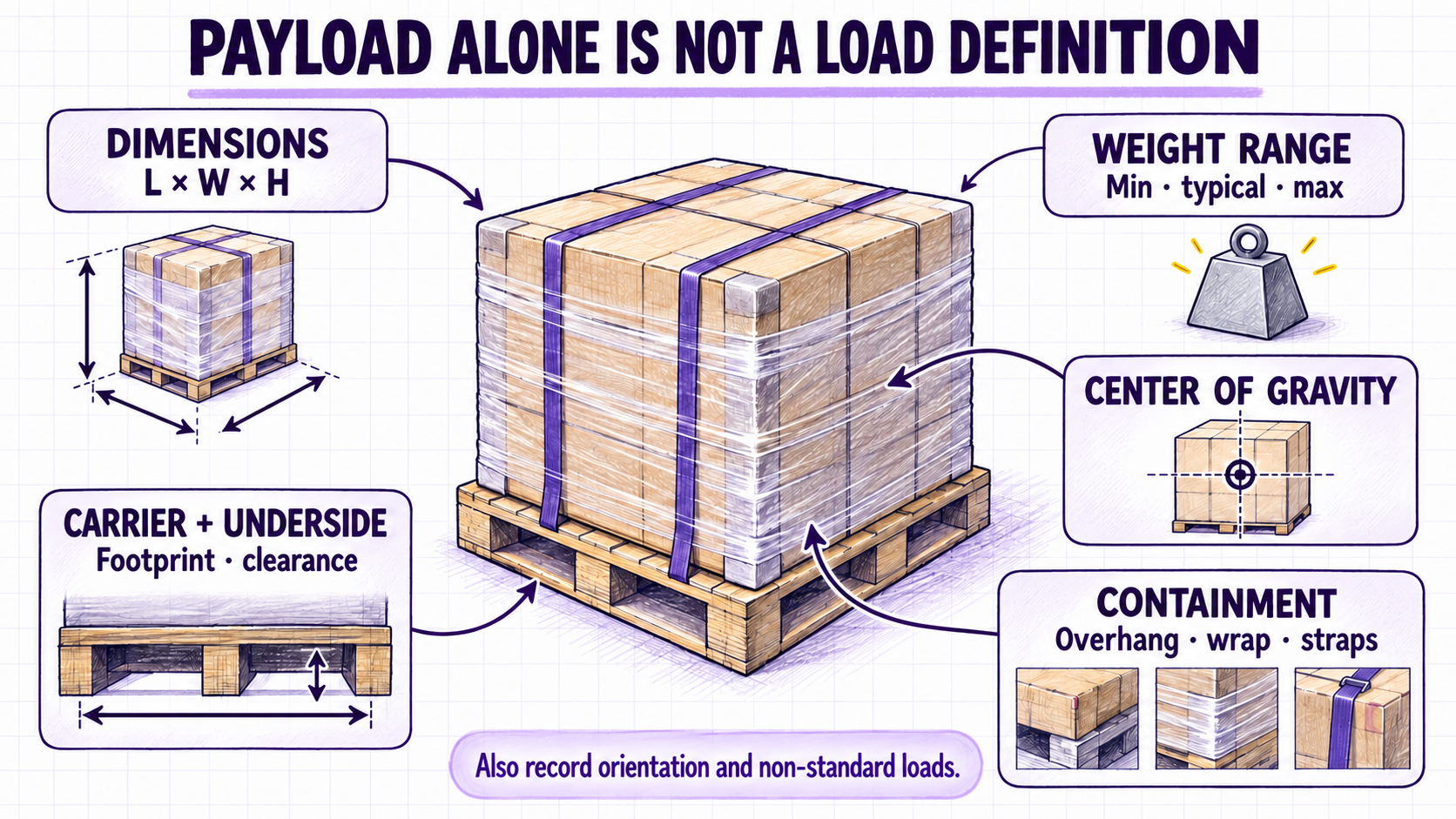
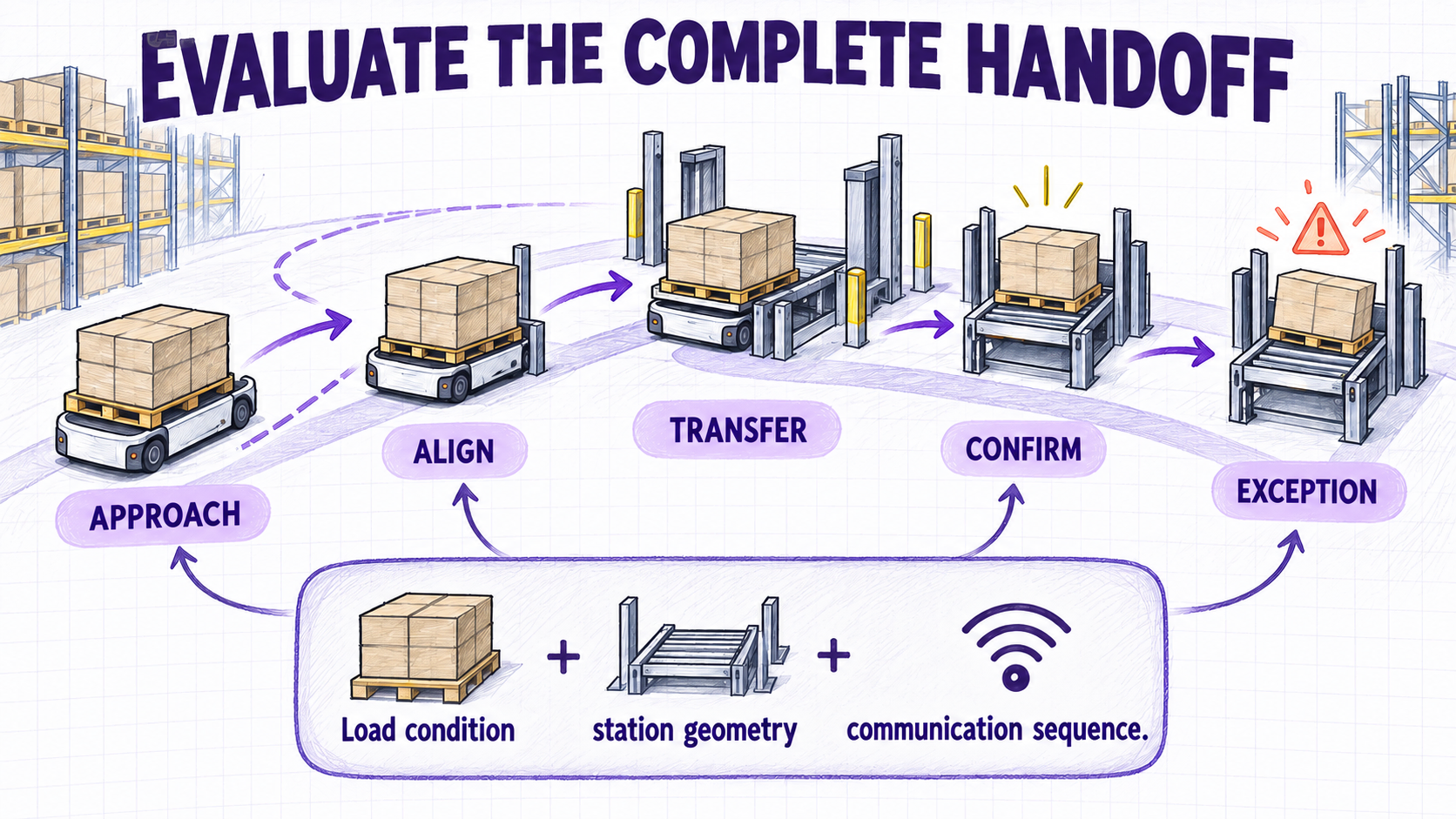
Payload capacity alone does not describe a load-handling task. The project team needs information about the transported material, its carrier, its stability, and the way it enters and leaves the mobile system.
Record the following for each load type:
- load carrier: pallet, tote, cart, rack, cage, bin, fixture, or custom carrier;
- minimum, typical, and maximum combined weight;
- length, width, and height;
- center-of-gravity concerns or uneven loading;
- overhang, loose material, stretch wrap, straps, or other containment;
- orientation requirements;
- pickup and delivery height;
- required positioning tolerance;
- human, conveyor, machine, rack, or floor-level handoff;
- damaged or non-standard loads that appear in normal operation.
Pair photographs with dimensions and context; an image may not show carrier footprint, underside clearance, wheel arrangement, or approach space.
During design, the attachment, payload, tooling, overall footprint, pickup and drop-off points, charging locations, and docking parameters are assessed together. Treat them as connected evaluation questions rather than a universal design rule.
Do not assume that a robot category determines handoff performance. The proposed vehicle, attachment, station geometry, load condition, communication sequence, and final approach must be evaluated together.
Map the site and shared traffic
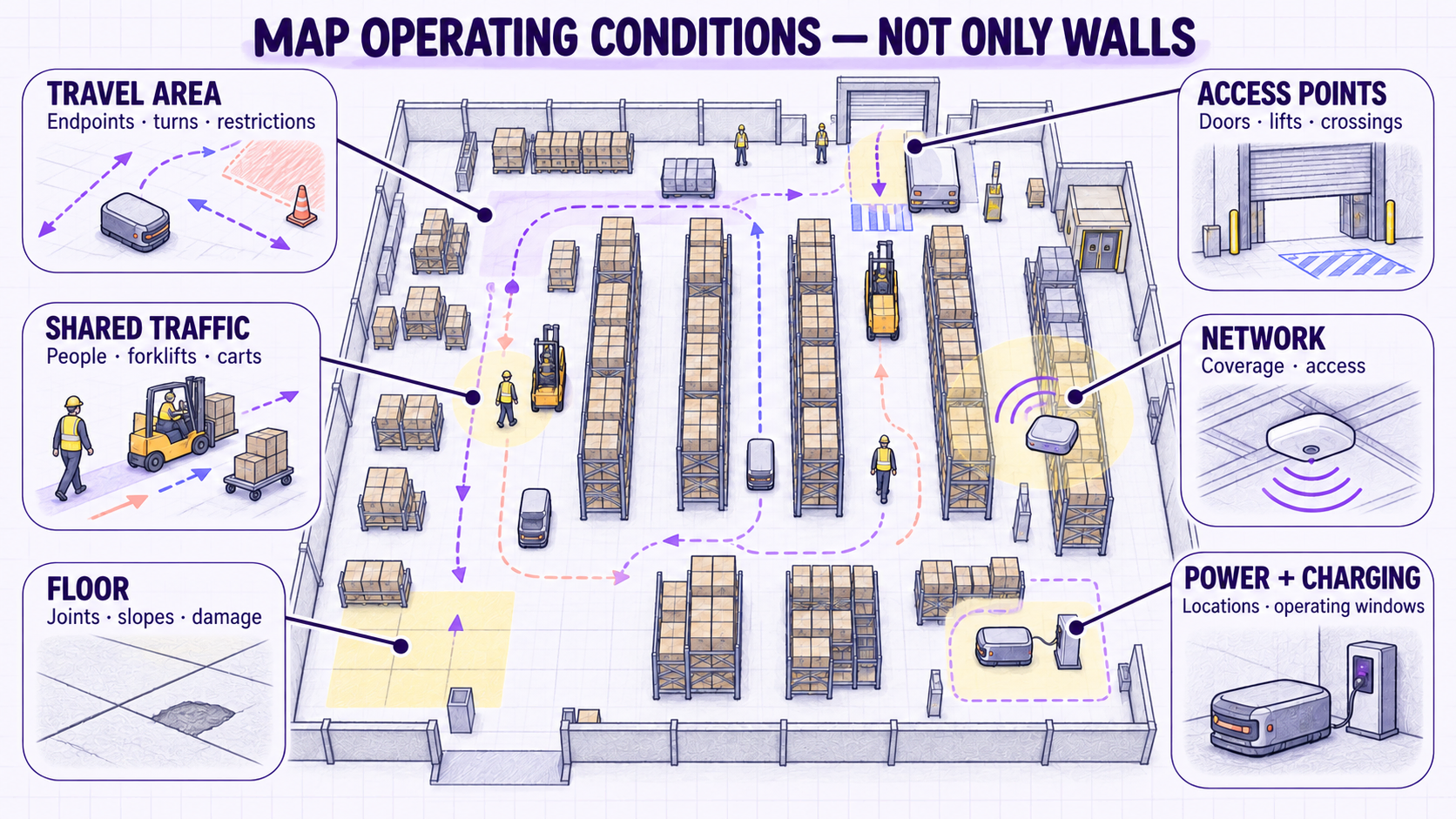
Prepare a current layout showing the proposed pickup point, destination, likely travel area, charging options, and any location where the robot may interact with people or equipment.
Mark:
- aisle and doorway widths;
- turns, dead ends, and restricted areas;
- slopes, ramps, thresholds, drains, and floor transitions;
- floor damage, joints, uneven areas, and contamination;
- doors, lifts, conveyors, machines, and controlled access points;
- fire routes and access that must remain available;
- pedestrian crossings and busy work areas;
- forklifts, pallet trucks, carts, and other mobile equipment;
- temporary storage or staging that can obstruct routes;
- areas where the layout changes during a shift or season.
A CAD drawing should not replace a site walk; plans may omit temporary staging, floor damage, changing traffic, or actual aisle use.
Aisle width and floor condition are early readiness questions, and traffic, layout, charging, and integration behave as connected planning inputs. General experience only indicates what to check; the project team must verify the actual site and the proposed system.
The checklist should document conditions, not declare them acceptable. Required clearance, floor quality, slope limits, environmental limits, and traffic controls depend on the proposed equipment and site-specific assessment.
Prepare systems, network, power, and charging information
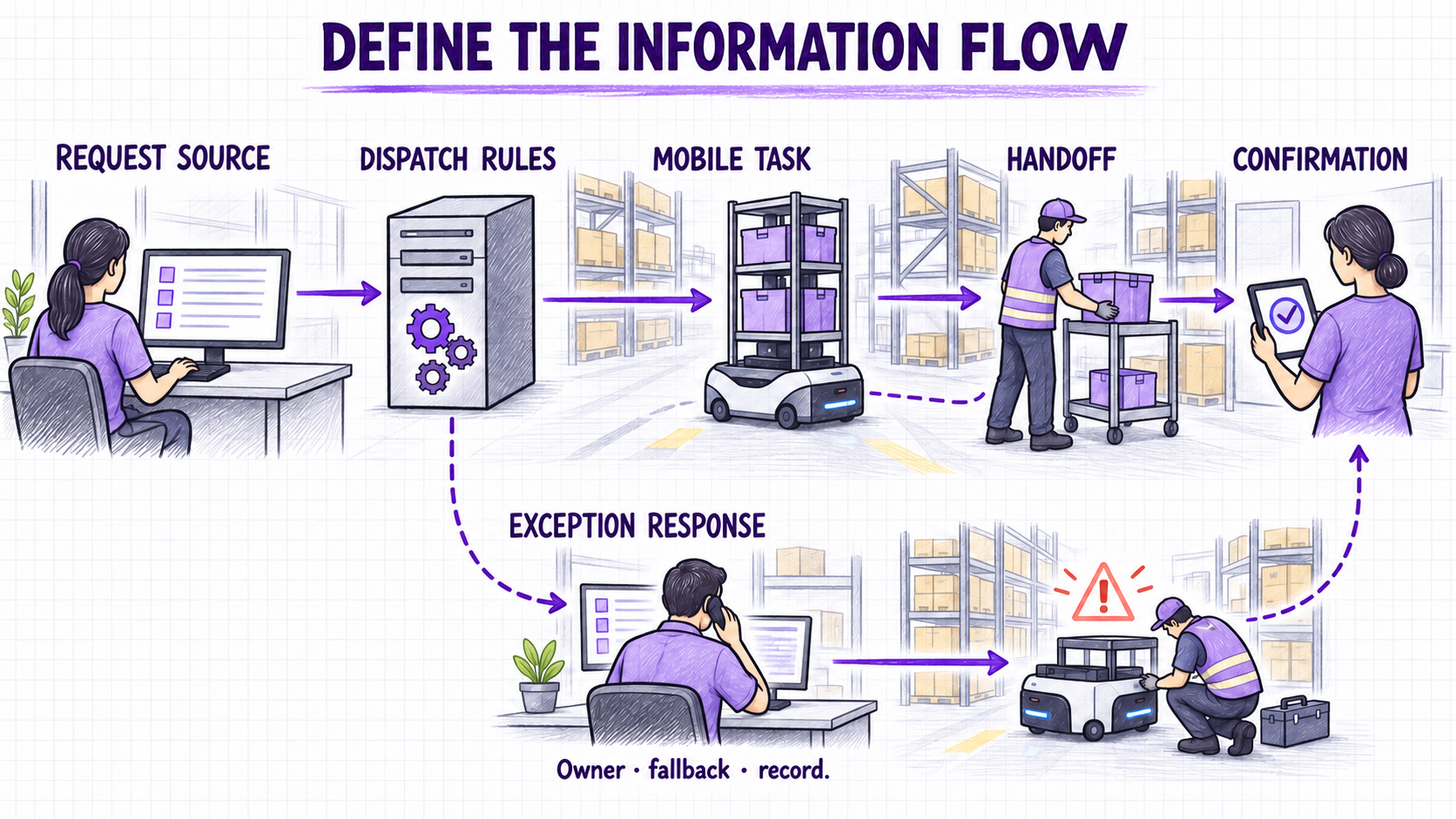
A mobile robot task needs a clear source of instructions and a clear definition of completion.
Ask:
- What creates a transport request?
- Is the request manual, scheduled, sensor-triggered, or issued by another system?
- What information must accompany the request?
- How is the pickup location selected?
- How is successful delivery confirmed?
- Which system records task status or exceptions?
- What should happen if a destination is full or unavailable?
- Does the workflow involve a WMS, WCS, WES, MES, ERP, PLC, conveyor, door, lift, scanner, or machine controller?
- Who owns each system and its interface?
- What network, remote-access, cybersecurity, or authentication requirements apply?
- Where could charging equipment be installed, and when can vehicles charge without disrupting demand?
Do not write “WMS integration required” without explaining what information must move between systems. A simple call-and-send workflow and a fully orchestrated, inventory-aware process create very different integration requirements.
Recurring design questions cover MES/WMS and PLC connections, IT bandwidth, software deployment, data exchange, authentication, map rules, dispatch logic, and endpoint behavior. Facility and team readiness, implementation, WMS/ERP integration, and ongoing support remain separate responsibilities. These categories are prompts; the selected design determines the actual interfaces and responsibilities.
The project brief should state the required business behavior. The detailed interface design belongs to the selected solution and its technical stakeholders.
Assign people, safety, and exception ownership
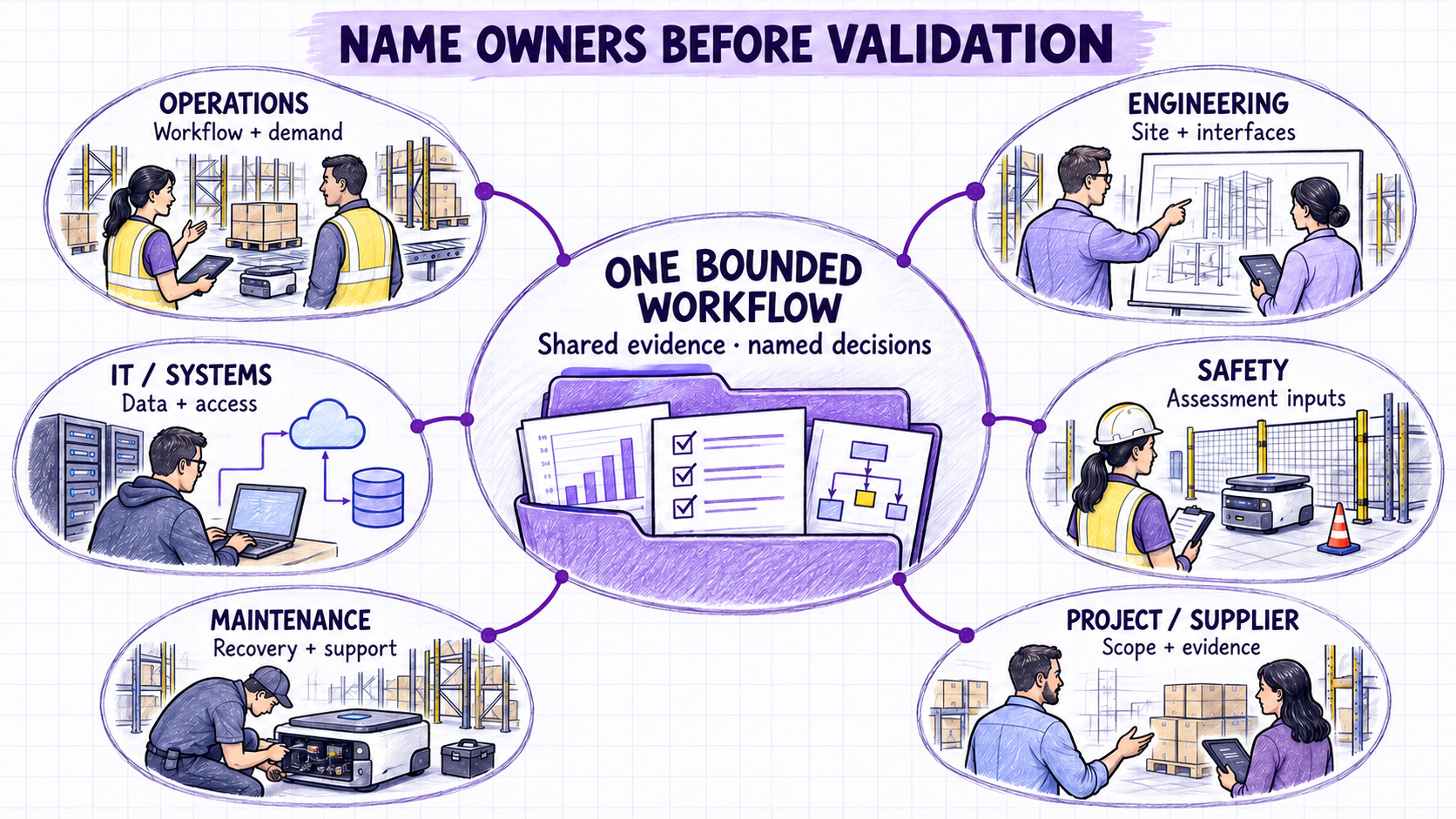
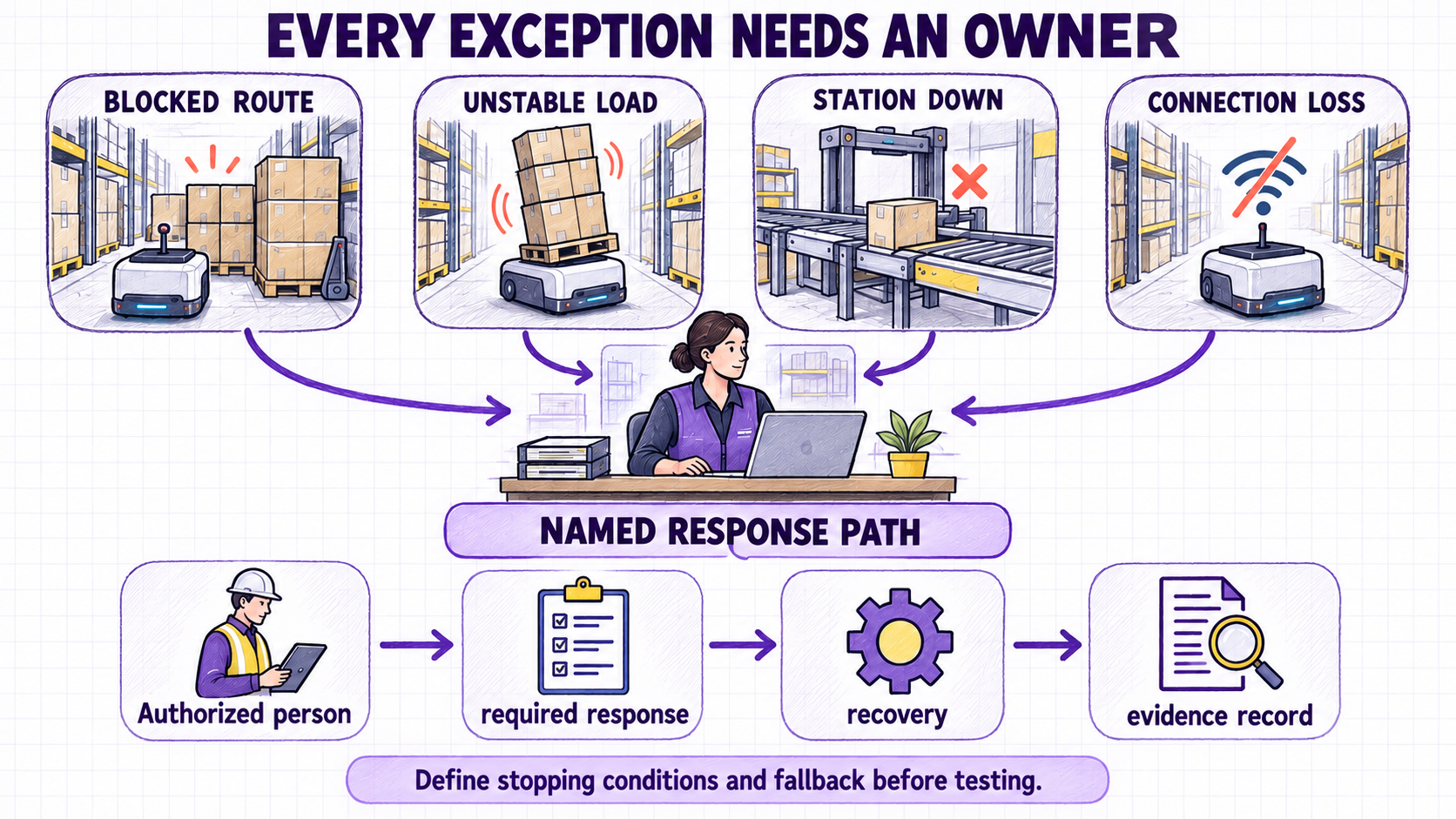
Warehouse robot projects cross departmental boundaries. Identify responsible people before validation begins, not after an issue appears.
Depending on the project, relevant roles may include:
- warehouse or production operations;
- engineering or facilities;
- IT and relevant system owners;
- environment, health, and safety;
- maintenance or technical support;
- procurement or project management;
- supervisors and front-line users;
- the selected supplier or system integrator.
For each group, record decisions, inputs, and approvals it owns. Also define who responds when a load is unstable, a route is blocked, a station is unavailable, a task cannot complete, a vehicle needs recovery, or the system connection is lost.
A typical project sequence covers internal preparation, workforce engagement, risk assessment, limited-scope validation, and training, with facility and team readiness confirmed before implementation. These patterns indicate useful participants, but they do not determine legal or safety responsibilities for a particular site.
This guide is not a risk assessment and must not be used as evidence that an application is safe. The complete system—including the vehicle, load, attachments, stations, software, operating area, people, maintenance, and foreseeable misuse—requires a site-specific assessment by qualified parties under the applicable requirements.
Standards are applicability checks, not approvals
ISO 12100 provides a general machinery risk-assessment and risk-reduction method; it is not an application-specific acceptance rule. ISO 3691-4 addresses safety requirements and verification for driverless industrial trucks and their systems within its stated scope and exclusions. In the United States, the relevant parts of ANSI/A3 R15.08 address industrial mobile robots, system/application integration, and user operation. None of these links proves compliance or replaces a site-specific assessment. Confirm the applicable edition, jurisdiction, equipment classification, system boundary, and other requirements with qualified parties.
Add only the details required by the candidate robot family
The common brief comes first. Then add only the fields needed to evaluate the candidate robot family and the real load-transfer method. Do not ask the customer to complete every row below. A candidate family is a starting point for evaluation, not a final product recommendation.
| Candidate family | Additional details to collect when relevant | Current BotOnly content boundary |
|---|---|---|
| AGV | Guidance or route-control needs; pickup, delivery, parking, and charging stations; cart or trailer coupling; total towed load and train length for towing; under-clearance, lift stroke, and transfer geometry for low-profile lifting; who loads and unloads. | Use only for verified tow-tractor and low-profile lifting AGV applications. Do not add unlisted AGV forms. |
| AMR | Load carrier and top module; pickup and drop interface; conveyor height, transfer direction, and completion signal; tote, rack, pallet, or fixture geometry; clearances; lift or rotation requirements when applicable. | Use only the verified lifting, rotating, conveyor, tote-handling, telescopic-fork, mobile-manipulator, and heavy top-load forms represented in current BotOnly product source material. |
| Autonomous forklift | Pallet type and opening; fork-entry direction and geometry; fork dimensions and load center; floor, rack, or conveyor pickup; lift height and residual-capacity requirement; mast and overhead limits; aisle and turning space; manual or automatic operation; indoor or outdoor conditions when relevant. | Use only verified pallet-handling, reach, counterbalance, very-narrow-aisle, tow-tractor, and manual/automatic forms represented in current BotOnly product source material. |
| Autonomous stacker | Pallet compatibility; outrigger, front-leg, or counterbalance constraints; stacking and rack levels; lift height and residual-capacity requirement; beam, rack, and handoff geometry; aisle and turning space; manual or automatic operation when relevant. | Use only verified compact, pallet-stacker, counterbalance, narrow-aisle, and front-leg forms represented in current BotOnly product source material. |
When a product form is not represented in the current BotOnly source set, leave it out of the public guide until a verified source is added. If the available information cannot confirm a required value, mark it Unknown and turn it into a question for evaluation.
Define a proportionate validation and acceptance method
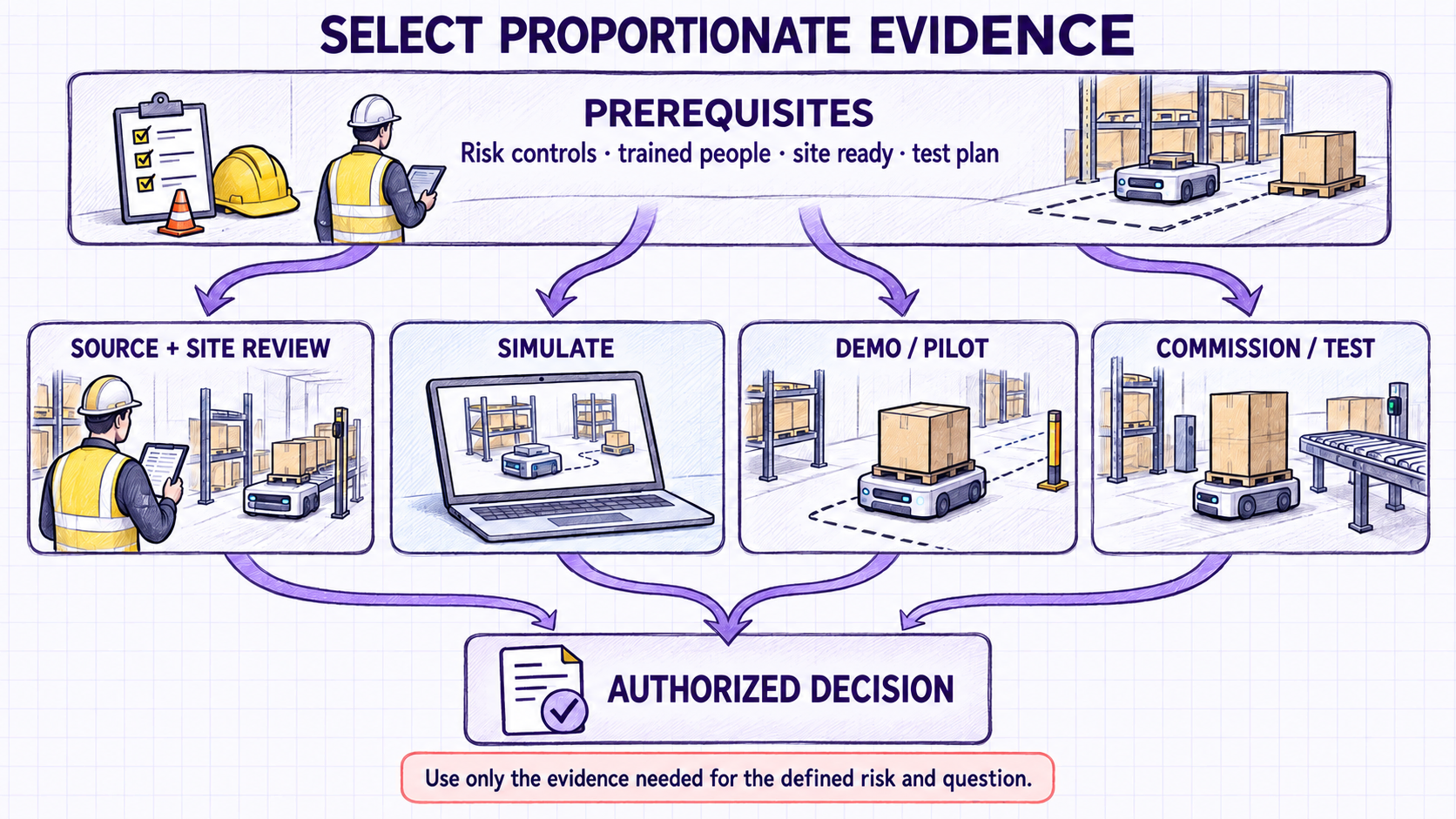
Choose only the evidence methods needed for the project: requirements and source review, current-layout and site review, simulation where it materially tests throughput or space, a representative demonstration or limited pilot when needed, and on-site commissioning or workflow testing for the selected solution. Contractual factory or site acceptance stages may be added when the project and supplier agreement require them; they are not universal BotOnly steps.
Define:
- the question each stage must answer;
- representative workflow, load, traffic, handoff, and exception conditions;
- acceptance threshold, measurement method, duration or sample, and evidence record;
- owner, witness, approver, stopping conditions, and fallback;
- criteria for revising, repeating, progressing, or rejecting the result.
Test the complete workflow, not only robot motion. A full commissioning sequence normally covers endpoint and communication checks, workflow and docking tests, interlocks, route rules, stabilization, training, documentation, and recovery readiness. The project team must select and define its own gates.
Starting with a limited initial scope while keeping expansion in view is a common approach, not a required pilot size or duration. The validation sequence should follow the workflow, integration complexity, risks, contractual responsibilities, and evidence needed for the decision.
Copyable warehouse robot project brief
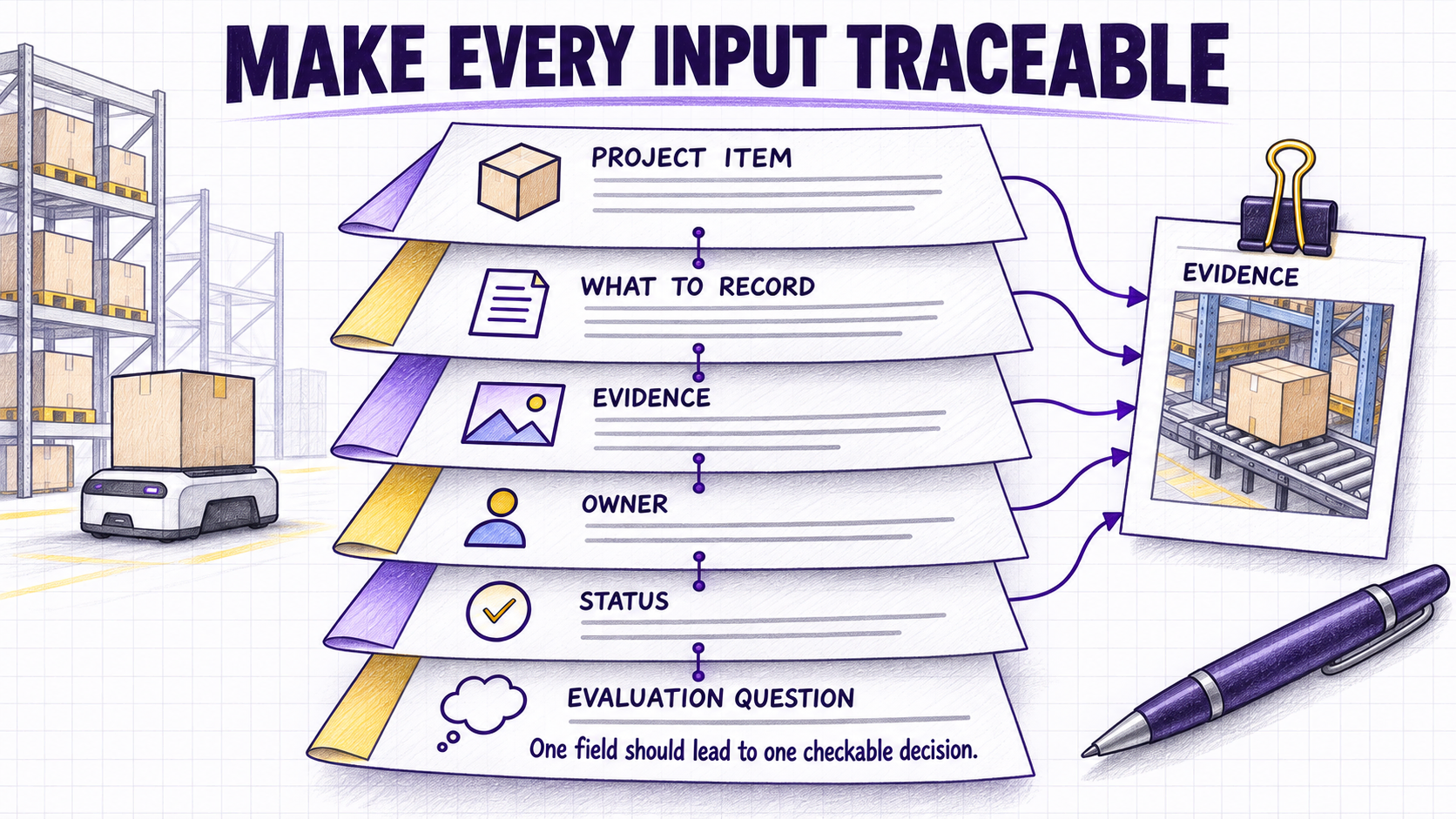
Copy these tables into your working document. Add rows when the workflow has additional loads, endpoints, systems, or operating conditions. Use only these status values: Measured, Estimated, Unknown, and NA.
| Brief control | Entry |
|---|---|
| Site / facility | |
| Workflow name | |
| Document owner | |
| Revision / date | |
| Scope | |
| Out of scope | |
| Target decision date |
| Project item | What to record | Evidence or source | Owner | Status (Measured / Estimated / Unknown / NA) | Question for evaluation |
|---|---|---|---|---|---|
| Business problem | The observable problem and desired operational change | Process review, logs, interviews | |||
| Workflow boundary | Trigger, pickup, move, delivery, confirmation, exception | Process map, site walk | |||
| Measurable target | Metric, baseline, target, time window, and business reason | Approved project objective | |||
| Normal demand | Tasks or moves by hour, shift, or day | WMS/MES report or observation | |||
| Peak demand | Peak period, duration, mix, and required service level | Historical report or estimate | |||
| Load carrier | Pallet, tote, cart, rack, cage, fixture, or other carrier | Photos and specification | |||
| Load range | Minimum, typical, and maximum weight and dimensions | Measurement record | |||
| Load stability | Center of gravity, overhang, containment, damaged-load cases | Photos, inspection | |||
| Pickup and delivery | Height, approach, alignment, interface, completion signal | Drawings, measurements, video | |||
| Route and clearance | Distance, aisles, turns, doors, ramps, restrictions | Current layout and measurements | |||
| Floor and environment | Surface, joints, slopes, contamination, temperature or other conditions | Site inspection | |||
| Shared traffic | People, forklifts, carts, crossings, staging, changing obstructions | Traffic observation | |||
| Task trigger | Manual, scheduled, sensor, or system-generated request | Workflow and system record | |||
| System connections | WMS/WCS/WES/MES/ERP/PLC/equipment and required data | System-owner review | |||
| Network and access | Coverage, bandwidth, remote access, authentication, security constraints | IT review | |||
| Charging and power | Possible locations, supply, access, and charging windows | Facilities review | |||
| Schedule and site availability | Decision milestones, access windows, shutdown limits, and dependencies | Project schedule | |||
| Commercial constraints | Budget status, procurement rules, contract boundaries, and excluded costs | Procurement review | |||
| Exception handling | Blocked route, bad load, unavailable station, connection loss, recovery | Existing SOP or workshop | |||
| Applicable safety requirements | Jurisdiction, standards, policies, equipment classification, scope, edition, and assessment owner | Qualified safety review | |||
| Validation scope | Selected methods, area, loads, scenarios, fallback, and data collection | Validation plan | |||
| Training and support | Operators, maintenance, documentation, escalation | Training plan | |||
| Future change | Expected volume, layout, route, load, or system changes | Business plan or estimate |
Candidate-family add-on. Complete one or more rows only when that family remains under evaluation. Record the source for every value; use Unknown instead of assuming.
| Candidate family | Additional project fields | Useful evidence |
|---|---|---|
| AGV | Guidance or route-control need; station locations; cart or trailer coupling; total towed load and train length; or, for low-profile lifting, under-clearance, lift stroke, and transfer geometry; load and unload ownership. | Route drawing, station photos, cart or trailer specification, coupling dimensions, measured load, handoff video. |
| AMR | Load carrier and top module; pickup and drop interface; conveyor height, transfer direction, and signal; tote, rack, pallet, or fixture geometry; clearance; lift or rotation need. | Load and rack drawings, interface photos, equipment specification, signal list, measured dimensions, handoff video. |
| Autonomous forklift | Pallet type and opening; fork-entry direction and geometry; fork dimensions and load center; pickup source; lift height and residual-capacity need; mast and overhead limits; aisle and turning space; manual or automatic operation; environment when relevant. | Pallet and load specification, rack drawing, aisle survey, pickup video, height measurements, equipment and site records. |
| Autonomous stacker | Pallet compatibility; outrigger, front-leg, or counterbalance constraint; stacking and rack levels; lift height and residual-capacity need; beam, rack, and handoff geometry; aisle and turning space; manual or automatic operation. | Pallet and rack drawings, beam and level dimensions, aisle survey, load specification, pickup and putaway video. |
Complete this record before testing. Keep only the gates this project actually needs, and delete the rest.
| Validation or acceptance gate | Question this gate must answer | Threshold | Measurement and sample | Evidence and approver | Outcome |
|---|---|---|---|---|---|
| Requirements and source review | Are the recorded workflow, load, demand, and system inputs complete and traceable enough to evaluate? | ||||
| Site and layout review | Do the actual aisles, floors, endpoints, traffic, and charging locations match the documented layout? | ||||
| Simulation | Do the throughput, fleet-size, and space assumptions hold under normal and peak demand? | ||||
| Representative demonstration or limited pilot | Does the proposed solution handle representative loads, handoffs, traffic, and exceptions? | ||||
| Commissioning and workflow testing | Does the installed system complete the full workflow, including interfaces, recovery, and operator procedures? | ||||
| Contractual factory or site acceptance | Are the acceptance obligations defined in the project agreement met? |
Include simulation only when throughput or space must be tested, a demonstration or limited pilot only when real operating conditions must be observed, and contractual factory or site acceptance only when the project agreement requires it.
What happens after the brief is submitted?
The copyable brief above is a preparation tool; it is not a second online form. BotOnly’s current RFQ offers two paths: Talk to a specialist and Request a quote.
For either path, the current online form requires the request type, work email, full name, company, location, and industry. Role, team size, facility size, category interests, timeline, operating pain points, current WMS or equipment information, and attachments can be added when available. Attachments are optional and may include images, PDF, Word, or Excel files, with a current limit of 10 MB per file.
If you choose Talk to a specialist, a phone number, meeting date, and meeting time are required. The selected time is used to book a 20-minute assessment conversation, followed by the confirmation and calendar details for that booking.
If you choose Request a quote, the phone number is optional. The current public response states that budget pricing will be sent to the submitted work email within one business day, followed by contact from the BotOnly team. Budget pricing is an initial response, not a guaranteed final project quotation. A detailed quotation depends on the application information available and may require further clarification.
After submission, the review can proceed in this order:
- Check the information provided, its sources, and unresolved gaps.
- Confirm the business objective, workflow boundary, and current operating baseline.
- Review the load, handoff, site, traffic, systems, safety inputs, and exception ownership.
- Identify one or more candidate robot families and request only the additional category-specific details needed.
- Ask for missing information by email when the submitted record is not sufficient for a scenario assessment or detailed quotation.
- Return a gap list and clarification questions before calculating fleet size, cost, schedule, or ROI.
- Agree on proportionate evidence methods and acceptance criteria for the proposed solution when the project reaches that stage.
This combines BotOnly’s current first-contact route with an industry-style evaluation sequence. The exact assessment output after a specialist conversation depends on the customer’s request; supporting-material delivery will be added only after that workflow and package are formally defined.
A completed brief does not mean the project is approved. It means the evaluation can begin with a shared, traceable description of the task.
How do you know the brief is ready?
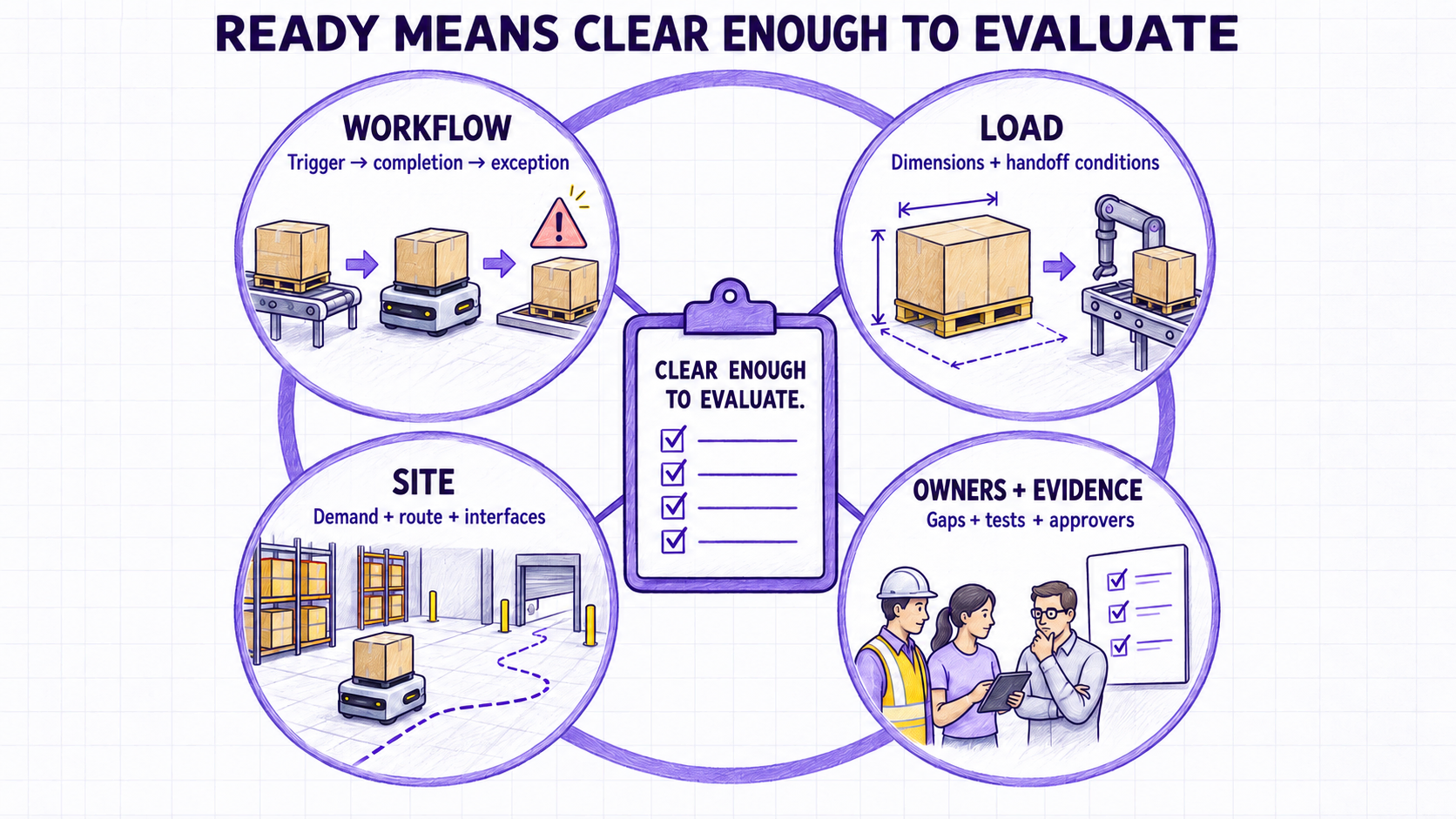
The brief is ready for an initial evaluation when:
- another person can follow the workflow from trigger to completion;
- the load and handoff are described with measurements, not only names;
- normal and peak demand are separated;
- the proposed route and major traffic interactions are visible;
- system owners and required information exchanges are identified;
- safety, maintenance, and exception owners are named;
- estimates and unknowns are clearly labeled;
- the selected validation and acceptance methods have thresholds, measurements, test duration or sample, evidence, and approvers.
It does not need to answer every engineering question. Its purpose is to reveal which facts are already known and which must be validated.
Frequently asked questions
Do I need a CAD drawing before contacting a supplier?
Not always. A dated current layout with endpoints, possible travel areas, doors, crossings, charging options, and key dimensions can start the discussion. Detailed design may require verified drawings and measurements.
Should we choose a robot category before preparing the brief?
No. Document the task, load, route, handoff, traffic, operating conditions, and required outcome first. Use the same common brief to compare AGVs, AMRs, autonomous forklifts, or autonomous stackers, then add only the category-specific fields relevant to each candidate. If navigation is still the main question, the earlier AGV vs AMR guide explains that narrower distinction.
What if our demand data is incomplete?
Record the source and period of available data. Mark estimates and unknowns; use targeted observation or data extraction for priority gaps. Missing does not mean zero.
Does a warehouse need a WMS before using mobile robots?
It depends on the workflow and proposed solution. Document how work is created and confirmed today, then require each proposal to explain its interfaces, dependencies, and limitations.
How many robots will we need?
Fleet size depends on time-based demand, travel, handoff, waiting, traffic, charging, availability, task rules, and exceptions. Require every calculation or simulation to state its assumptions.
What should a first validation plan test?
Test the bounded workflow with representative loads, normal and demanding conditions, expected traffic, handoffs, communication, exceptions, recovery, and operator procedures. Define thresholds and stopping criteria before the selected review, simulation, demonstration, pilot, commissioning, or workflow test. A free-driving demonstration does not validate the complete operation, and factory or site acceptance should be included only when the project agreement requires it.
Does completing this checklist mean the application is safe?
No. The checklist helps prepare information for evaluation. It is not a site-specific risk assessment, safety validation, compliance determination, or operating approval. Qualified parties must evaluate the complete proposed system and operating environment under the applicable requirements.
Standards and technical references
These references define the scope and method behind the safety and verification points in this guide. They do not certify any specific application; confirm the applicable edition, jurisdiction, equipment classification, and system boundary for each project.
Ready to evaluate warehouse automation?
Use this guide’s workflow, load, route and site inputs to compare AGVs, AMRs, autonomous forklifts and stackers.